Troubleshooting
CyClaw is not responding or behaving abnormally
During a conversation with your CyClaw in the bot, certain actions may cause it to stop working correctly. Common scenarios include:
- You asked CyClaw to perform an irreversible operation that corrupted its internal state
- CyClaw entered an unexpected loop or error state and can no longer respond normally
- Configuration was changed through chat in a way that broke the instance
In these cases, the recommended solution is to use Reset Config on the instance details page to restore the instance to its initial state.
Warning
Reset Config will reinitialize your CyClaw instance. This means all conversation history and any runtime changes made through chat will be lost. However, the core instance configuration — including your bot setup, model selection, and pre-installed skills — will be restored to the state when the instance was first created.
To reset, open your instance details page and click Reset Config:
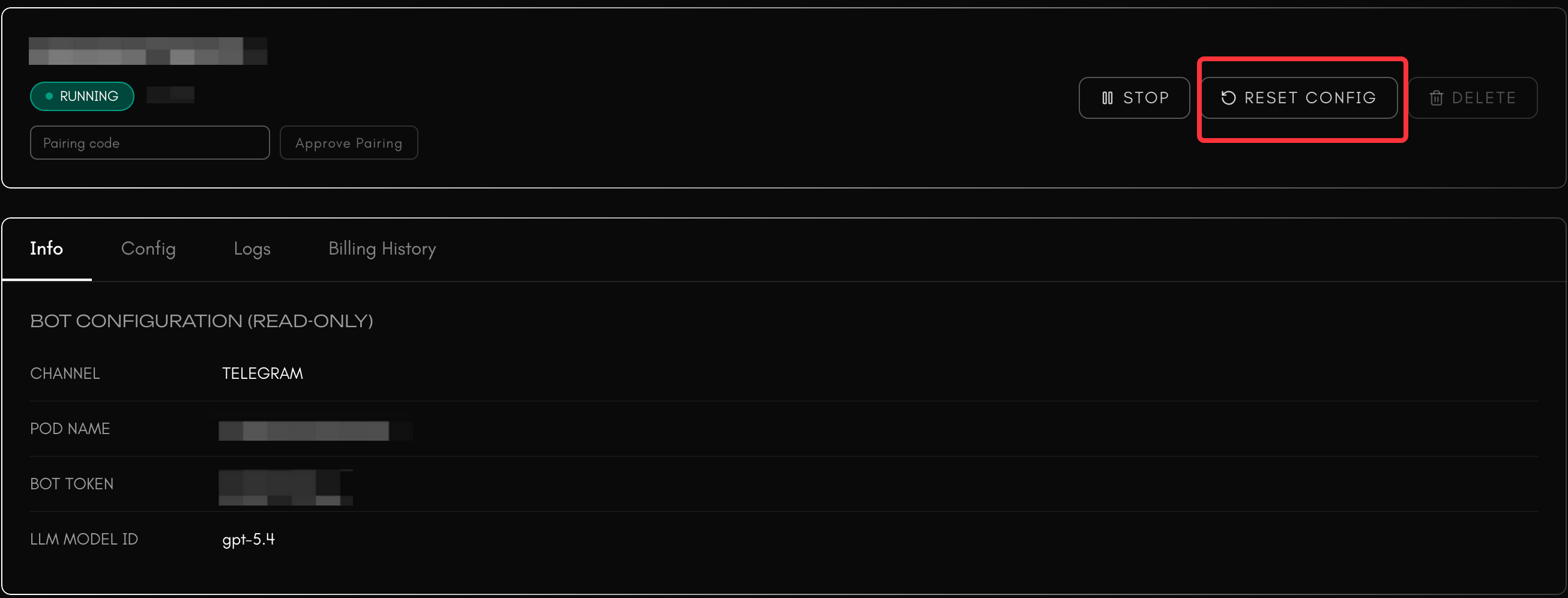
After the reset completes, your CyClaw will return to its initial state and should be usable again.
How do I change the model later?
You can ask your CyClaw directly.
For example, if you created the instance with GPT5.1 and later find a model you prefer on Cysic Models, such as GPT5.4, you can simply say:
Please help me switch the model to GPT5.4
Your CyClaw can then update the model configuration through conversation, depending on the current product capabilities.
What if channel pairing fails?
Check that your bot credentials, app ID, app secret, pairing code, and related settings match the corresponding Telegram, Discord, or Feishu platform configuration. If the pairing code is time-sensitive, make sure it is used before it expires.
What if skill installation fails?
Check whether:
- The skill is compatible with your current CyClaw version
- Your account has enough balance if the skill requires payment
- The instance has the required permissions or environment
If needed, try again from the instance details page or ask CyClaw to retry through chat.
Where can I review billing details?
For token usage and inference-related billing details, check the inference platform at ai.cysic.xyz/models. For hosting-related billing details, open your instance details page.